Istio Hands-on Part 6 - Distributed Tracing with Jaeger
Objective
Set up distributed tracing with Jaeger. You will:
- Enable tracing in Istio
- See one request as a timeline across frontend and backend
- Understand how trace IDs move between services
- Fix the most common reason traces do not appear
Why tracing
A request in a microservice system can cross many services. Metrics tell you that something is slow. A trace tells you which hop is slow.
Envoy sidecars can record spans and send them to Jaeger. One condition applies: the request must carry trace headers, for example x-b3-traceid and x-b3-spanid.
In the current setup:
- The frontend runs plain
curl. It sends no trace headers. - The backend is a static echo server. It adds no trace headers.
Envoy sees plain HTTP with no trace context, so nothing appears in Jaeger. This part fixes that.
Step 1: A frontend that sends trace headers
Replace the frontend with a loop that sets B3 headers on every request. This simulates an application with tracing support.
cat <<'EOF' | kubectl apply -f -apiVersion: apps/v1kind: Deploymentmetadata: name: frontendspec: replicas: 1 selector: matchLabels: app: frontend template: metadata: labels: app: frontend spec: containers: - name: frontend image: curlimages/curl command: ["sh", "-c"] args: - | while true; do TRACE_ID=$(od -vAn -N8 -tx1 /dev/urandom | tr -d ' \n') PARENT_SPAN=$(od -vAn -N8 -tx1 /dev/urandom | tr -d ' \n') curl -s http://backend \ -H "x-b3-traceid: $TRACE_ID" \ -H "x-b3-spanid: $PARENT_SPAN" \ -H "x-b3-sampled: 1" sleep 5 done ports: - containerPort: 80---apiVersion: v1kind: Servicemetadata: name: frontendspec: selector: app: frontend ports: - port: 80 targetPort: 80EOFStep 2: Keep the backend
The backend (hashicorp/http-echo) needs no change. Its Envoy records a span as soon as it sees the trace headers.
Step 3: Enable tracing in Istio
The demo profile does not turn on tracing by default. Create istio-jaeger-tracing.yaml:
apiVersion: install.istio.io/v1alpha1kind: IstioOperatorspec: profile: demo meshConfig: enableTracing: true defaultConfig: tracing: sampling: 100 zipkin: address: jaeger-collector.istio-system.svc.cluster.local:9411 accessLogFile: /dev/stdout accessLogEncoding: TEXT accessLogFormat: '[%START_TIME%] "%REQ(:METHOD)% %REQ(X-ENVOY-ORIGINAL-PATH?:PATH)% %PROTOCOL%" %RESPONSE_CODE% traceID=%REQ(X-B3-TRACEID)% spanID=%REQ(X-B3-SPANID)% service=%DOWNSTREAM_LOCAL_ADDRESS%'Apply it:
istioctl install -f istio-jaeger-tracing.yaml -yThis configuration:
- Turns tracing on for the mesh
- Samples 100% of requests. Use a lower value in production.
- Sends spans to the Jaeger collector on port 9411
- Adds the trace ID and span ID to each access log line
Step 4: Restart the applications
The sidecars load the new configuration on restart:
kubectl rollout restart deploy frontend backendStep 5: Generate traffic
kubectl exec deploy/frontend -- sh -c 'while true; do curl -s http://backend > /dev/null; sleep 2; done'Step 6: Trace IDs in the access logs
kubectl logs -l app=frontend -c istio-proxy | grep traceIDExpected output:
[2025-11-11T10:31:23.108Z] "GET / HTTP/1.1" 200 traceID=- spanID=- service=10.96.245.140:80[2025-11-11T10:31:24.746Z] "GET / HTTP/1.1" 200 traceID=e28cfcca4e031099 spanID=07d23de702980446 service=10.96.245.140:80[2025-11-11T10:31:29.766Z] "GET / HTTP/1.1" 200 traceID=f8fd657e618fd308 spanID=9e389a992ffe0207 service=10.96.245.140:80[2025-11-11T10:31:34.783Z] "GET / HTTP/1.1" 200 traceID=340e3a3dbe1aadc3 spanID=7185231baf56ef9b service=10.96.245.140:80[2025-11-11T10:31:39.805Z] "GET / HTTP/1.1" 200 traceID=127182d353ae19f8 spanID=c43f75f2ca957569 service=10.96.245.140:80[2025-11-11T10:31:44.828Z] "GET / HTTP/1.1" 200 traceID=c682fbdfd41c0553 spanID=1e0f0891b5fc7b63 service=10.96.245.140:80[2025-11-11T10:31:49.845Z] "GET / HTTP/1.1" 200 traceID=8e4207db299688bd spanID=14721784089a0c9f service=10.96.245.140:80[2025-11-11T10:31:54.862Z] "GET / HTTP/1.1" 200 traceID=714450cb4972f4da spanID=efcc9f9bdd2170b7 service=10.96.245.140:80[2025-11-11T10:31:59.880Z] "GET / HTTP/1.1" 200 traceID=d931a777f2c8d035 spanID=c39eff4a035ddadc service=10.96.245.140:80[2025-11-11T10:32:04.901Z] "GET / HTTP/1.1" 200 traceID=0d30f976a64daaeb spanID=fa05b2dd92cf520d service=10.96.245.140:80The first line has no trace ID. That request came from the Step 5 loop, which sends no headers. Every request from the Step 1 frontend has a trace ID and a span ID.
Step 7: Traces in Jaeger
Forward the Jaeger UI port:
kubectl port-forward svc/jaeger-collector -n istio-system 16686:16686Open http://localhost:16686 and search for these services:
frontend.defaultbackend.default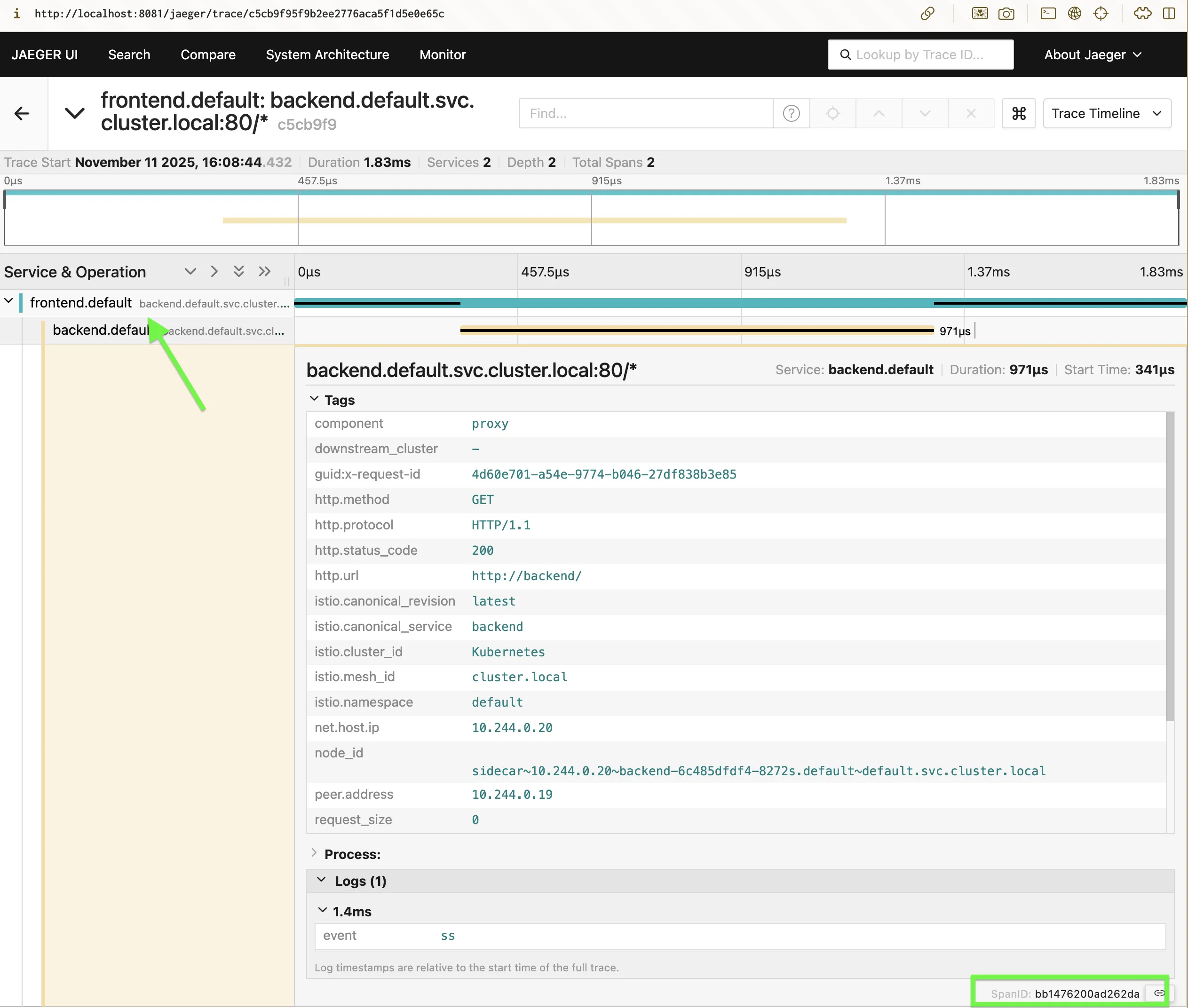
Each trace shows the hops, the latency of each hop, and the mTLS connection between them.
How it works
- The frontend Envoy sees the
x-b3-*headers and starts a span. - The call goes to the backend Envoy over mTLS. The headers travel with it.
- The backend Envoy creates a child span with the same trace ID.
- Both Envoys send their spans to the Jaeger collector on port 9411.
- Jaeger joins the spans into one trace.
Key terms
| Term | Meaning |
|---|---|
| Trace ID | One ID for one request across all services |
| Span ID | One segment of a trace, usually one hop |
| Jaeger collector | Receives spans from Envoy |
| Sampling | Share of requests that get traced |
Summary
- Enabled tracing in the mesh
- Sent B3 headers from the frontend
- Read trace IDs in Envoy access logs
- Viewed the full request timeline in Jaeger
Metrics, logs, and traces are now all available. Part 7 moves to security: mTLS and access policies.
Comments