Istio Hands-on Part 4 - Traffic Management with VirtualService and DestinationRule
Objective
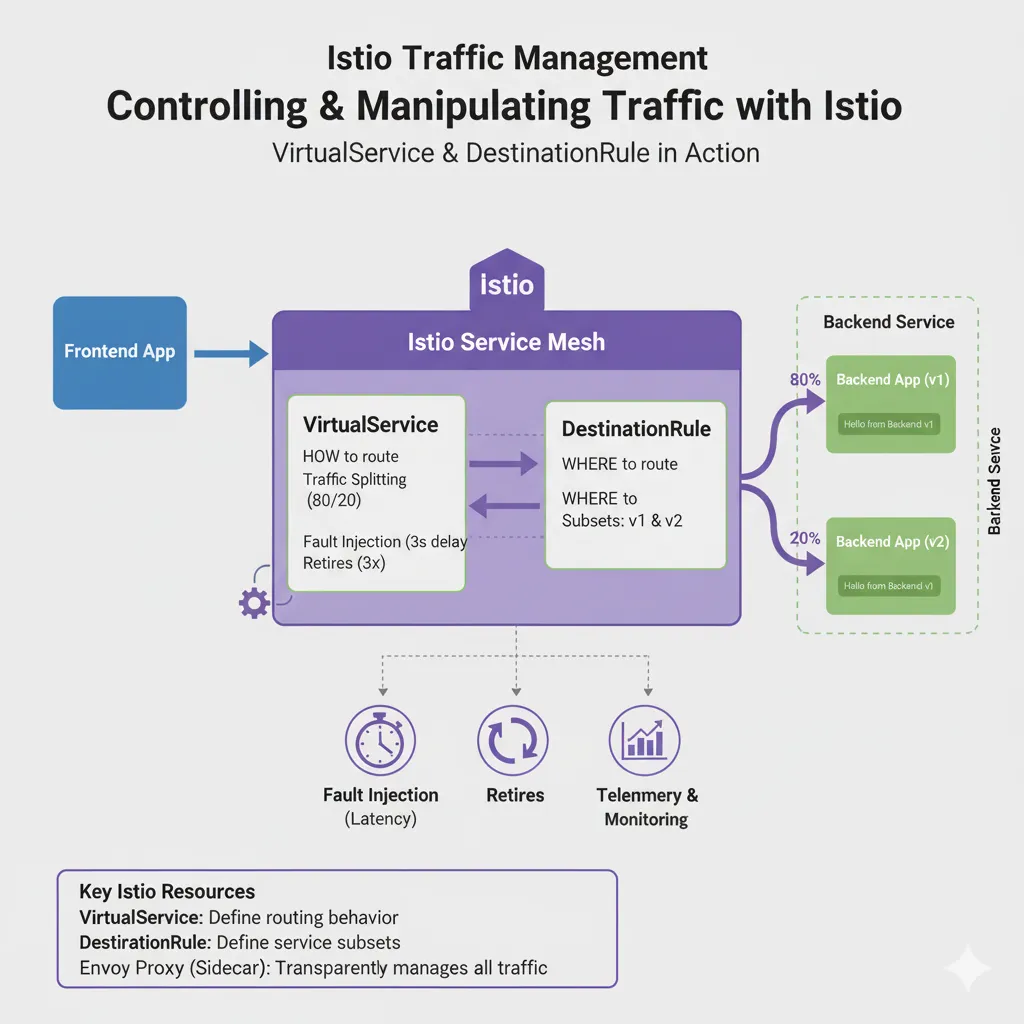
This part uses two Istio resources:
VirtualServicedefines how traffic is routed.DestinationRuledefines where traffic can go.
You will:
- Deploy two versions of the backend
- Split traffic between them
- Do a canary release
- Inject latency and add retries
Step 1: Current state
From Part 3 you have:
- A
frontenddeployment that callsbackend - Sidecar injection enabled
- Working
frontendtobackendtraffic
This part adds a second backend version, v2.
Step 2: Deploy backend v1 and v2
cat <<EOF | kubectl apply -f -apiVersion: apps/v1kind: Deploymentmetadata: name: backend-v1spec: replicas: 1 selector: matchLabels: app: backend version: v1 template: metadata: labels: app: backend version: v1 spec: containers: - name: backend image: hashicorp/http-echo args: ["-text=Hello from Backend v1"] ports: - containerPort: 5678---apiVersion: apps/v1kind: Deploymentmetadata: name: backend-v2spec: replicas: 1 selector: matchLabels: app: backend version: v2 template: metadata: labels: app: backend version: v2 spec: containers: - name: backend image: hashicorp/http-echo args: ["-text=Hello from Backend v2"] ports: - containerPort: 5678---apiVersion: v1kind: Servicemetadata: name: backendspec: selector: app: backend ports: - port: 80 targetPort: 5678EOFCheck:
kubectl get pods -l app=backendExpected output:
backend-v1-xxxxx 2/2 Runningbackend-v2-xxxxx 2/2 RunningStep 3: Add a DestinationRule
A DestinationRule defines subsets. A subset is a group of pods selected by label. Routing rules point at subsets.
cat <<EOF | kubectl apply -f -apiVersion: networking.istio.io/v1alpha3kind: DestinationRulemetadata: name: backendspec: host: backend subsets: - name: v1 labels: version: v1 - name: v2 labels: version: v2EOFCheck:
kubectl get destinationruleExpected output:
NAME HOST AGEbackend backend 9sStep 4: Create a VirtualService
Start with all traffic to v1.
cat <<EOF | kubectl apply -f -apiVersion: networking.istio.io/v1alpha3kind: VirtualServicemetadata: name: backendspec: hosts: - backend http: - route: - destination: host: backend subset: v1 weight: 100 - destination: host: backend subset: v2 weight: 0EOFStep 5: Test the route
kubectl exec deploy/frontend -- curl -s http://backendExpected output:
Hello from Backend v1Step 6: Split traffic 80/20
Move 20% of requests to v2.
cat <<EOF | kubectl apply -f -apiVersion: networking.istio.io/v1alpha3kind: VirtualServicemetadata: name: backendspec: hosts: - backend http: - route: - destination: host: backend subset: v1 weight: 80 - destination: host: backend subset: v2 weight: 20EOFSend ten requests:
for i in {1..10}; do kubectl exec deploy/frontend -- curl -s http://backend; doneExpected output, mixed:
Hello from Backend v2Hello from Backend v2Hello from Backend v1Hello from Backend v1Hello from Backend v1...This is a canary release. No application code changed.
Step 7: Inject latency
Make half of the requests wait three seconds.
cat <<EOF | kubectl apply -f -apiVersion: networking.istio.io/v1alpha3kind: VirtualServicemetadata: name: backendspec: hosts: - backend http: - fault: delay: percentage: value: 50 fixedDelay: 3s route: - destination: host: backend subset: v1 weight: 100EOFTest with timing:
for i in {1..5}; do kubectl exec deploy/frontend -- time curl -s http://backend; doneAbout half of the requests take three seconds:
Hello from Backend v1real 0m 3.01suser 0m 0.00ssys 0m 0.00sHello from Backend v1real 0m 0.01suser 0m 0.00ssys 0m 0.00sHello from Backend v1real 0m 0.00suser 0m 0.00ssys 0m 0.00sHello from Backend v1real 0m 3.02suser 0m 0.00ssys 0m 0.00sHello from Backend v1real 0m 0.01suser 0m 0.00ssys 0m 0.00sRemove the fault rule:
kubectl delete virtualservice backendStep 8: Add retries
Tell Istio to retry failed calls up to three times, with a two-second limit per try.
cat <<EOF | kubectl apply -f -apiVersion: networking.istio.io/v1alpha3kind: VirtualServicemetadata: name: backendspec: hosts: - backend http: - retries: attempts: 3 perTryTimeout: 2s retryOn: gateway-error,connect-failure,refused-stream route: - destination: host: backend subset: v1EOFSummary
| Feature | Resource | What it does |
|---|---|---|
| Traffic splitting | VirtualService + DestinationRule |
Route a share of requests to each version |
| Fault injection | VirtualService |
Add delays or errors for testing |
| Retries | VirtualService |
Retry failed calls |
All of this is configuration in the mesh. The application does not change. Part 5 shows how to watch this traffic with metrics and graphs.
Comments