Machine learning – Network traffic classification using weka
Overview
This post is about how to classify network traffic captured from wireshark using weka machine learning algorithm. I tried few other methods like nltk,sckikit,python scripts with naive bayes implementation and finally decided to use weka mainly because of its simplicity,easy to use and also because it is written in java so it is easier to integrate with other java applications(which is i am planning to do).You can check my github machine learning project page for the other methods i tried.
Software’s used
Wireshark
weka
Fedora
Step 1 :Installing the softwares
Install the wireshark and weka. Both of the software packeges comes with fedora default repositories, So we can just do the dnf install .
Step 2 :Capturing network packets using wireshark
Open wireshark and start capturing the packets in your network interface card . I used specific filters(http,telnet,etc) to capture different type of traffic so that i can use the same as traning set in weka. These captured traffic can be exported into csv file. The files used can be downloaded from my github
Step 3:Converting csv to arff format
We need to export this as csv because the weka application don’t support pcap file. The exported csv can be converted to arff format later using the weka arff viewer.
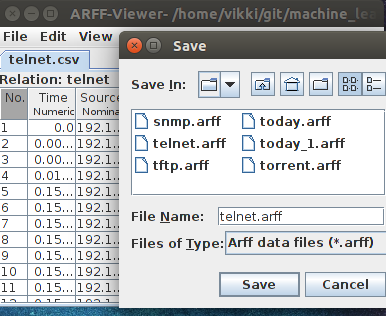
Now we have converted the wireshark output to arff so that it can be readable be the weka application. The next step is to define the class . Class is something like a category in which the specific instance is belongs to.
For this, I opened the arff file and manually defined the class based on the application the traffic is generated
| Traffic type | Application used |
|---|---|
| http | browser |
| ftp | filezilla client |
| bittorrent | peer-peer_client |
| snmp | monitoring_tools |
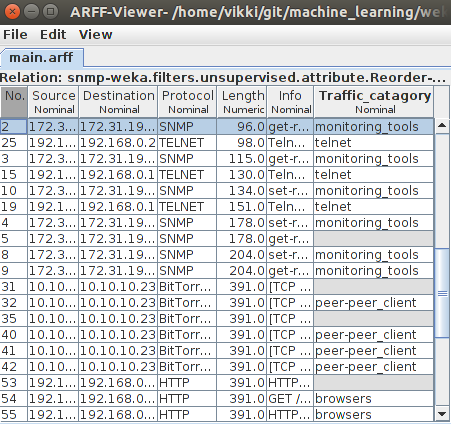
My final arff file is below, with the class name “Traffic\_category” added. Now if you see closely, for some of the instances(5,31,35,53) the “Traffic\_category” class is left undefined.In the next step i am going to use weka to predict the class in which the instance belongs to using machine learning algorithm.
Now i am going to run the weka J48ext machine learning algorithm to predict the traffic category.There are many algorithm supported by weka like zeroR,naive bayes,we can use any of this which is best suited for our datasets.
Make sure the class path is properly exported before executing the code. In my setup the weka.jar is located inside “/usr/share/java”
export CLASSPATH=$CLASSPATH:/usr/share/java/weka.jar~jython UsingJ48Ext.py main.arffThe code can be downloaded from github
The output contains 3 type of informations
1. Generated model
J48 pruned tree
Protocol = SNMP: monitoring_tools (10.0/1.0)Protocol = SRVLOC: telnet (0.0)Protocol = NBNS: telnet (0.0)Protocol = BROWSER: telnet (0.0)Protocol = ICMP: telnet (0.0)Protocol = TCP: telnet (0.0)Protocol = TELNET: telnet (18.0)Protocol = BitTorrent: peer-peer_client (12.0)Protocol = TFTP: filezilla (9.0)Protocol = HTTP: browsers (4.0)
Number of Leaves : 10
Size of the tree : 11
2. Evaluation
Correctly Classified Instances 52 98.1132 %Incorrectly Classified Instances 1 1.8868 %Kappa statistic 0.9753Mean absolute error 0.0136Root mean squared error 0.0824Relative absolute error 4.4312 %Root relative squared error 21.0904 %Total Number of Instances 53Ignored Class Unknown Instances 43. Prediction
1 5:monitori 5:monitori 0.9 2 5:monitori 5:monitori 0.9 5 1:? 5:monitori 0.9 6 5:monitori 5:monitori 0.9 7 5:monitori 5:monitori 0.927 4:telnet 4:telnet 128 4:telnet 4:telnet 129 2:peer-pee 2:peer-pee 130 2:peer-pee 2:peer-pee 131 1:? 2:peer-pee 132 2:peer-pee 2:peer-pee 133 2:peer-pee 2:peer-pee 134 2:peer-pee 2:peer-pee 135 1:? 2:peer-pee 136 2:peer-pee 2:peer-pee 137 2:peer-pee 2:peer-pee 143 3:filezill 3:filezill 144 3:filezill 3:filezill 145 3:filezill 5:monitori + 0.946 3:filezill 3:filezill 147 3:filezill 3:filezill 152 3:filezill 3:filezill 153 1:? 1:browsers 154 1:browsers 1:browsers 1Now the information provided in prediction is our focus.
It contains 4 column
Column number DetailsFirst column Instance numberSecond column Class defined in datasetThird column Class predicted by machine learningFourth column Probability that the instance is belong to the class predicted my machineNow if you notice the instance number 5,31,35 and 53 the class defined in dataset is empty(“?”) and the machine has predicted the class as monitoring_tool,peer-peer client and browser respectively. The “+” symbol in the instance number 45 denotes there is difference in the class defined in dataset and the class predicted by machine learning.
Comments